Building a 3D Interactive Lesson with AI and Three.js: From Energy Textbook to Working Prototype
Build a working 3D lesson through four rounds of prompts, then add eight-store exploration, a pop-up book, and a five-shot demo. Includes source code, a complete walkthrough, and fixes from testing.
A book falls from a shelf and ends up resting on the ground. Where did its initial gravitational potential energy go? Turning this question into an interactive lesson where students can predict, experiment, and explain is a concrete 3D educational design challenge.
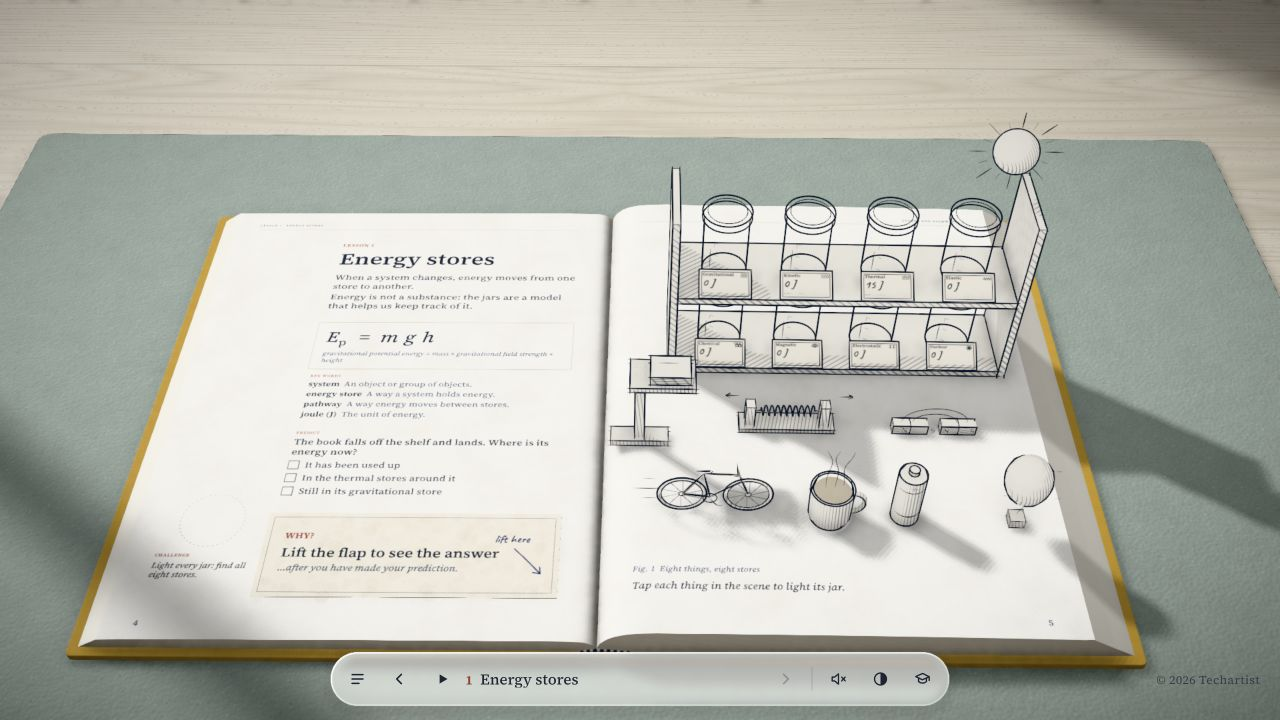
In Lesson 1 of Every Joule, a 3D web lesson published by Techartist, textbook illustrations are transformed into an interactive "papercraft pop-up book" via an in-browser Three.js scene. According to the original author, the lesson was built using Opus 5.5 and Three.js; the complete course is planned for 10 lessons, with Lesson 1 currently published and playable (the teacher preparation page notes it is designed for students aged 14–16). The visuals feature a book dropping from a shelf alongside a bank of glowing "energy jars" on the right, allowing students to observe gravitational potential energy emptying into kinetic energy, and ultimately dispersing upon impact into the thermal stores of the book, floor, and surrounding air.

The overall aesthetic relies on black-and-white paper line art, reserving glowing colors exclusively for energy stores and transfer pathways.
The four-round Chinese prompt sequence in this guide was executed sequentially by Codex from an empty directory, producing a working Three.js lesson with code and operational logs preserved at each stage. Because the original creator did not release their prompts or development timeline, the steps below were designed independently for this guide. Following the four rounds produces the falling-book experiment; completing the full eight-store exploration seen in the original lesson requires the supplementary rounds that follow.
When using AI to help develop 3D educational materials, a common cognitive trap is equating "impressive 3D visuals" with "achieving pedagogical goals." Generating materials purely from generic instructions often produces code where mesh displacement is decoupled from physical accounting logic. Furthermore, if a page lacks clear task constraints, students frequently treat the 3D environment as a toy to drag around aimlessly, struggling to form the core physical connection: "as height decreases, potential energy decreases and kinetic energy increases."
Techartist's Pedagogical Loop: Predict, Watch, Try, and Explain
Bringing paper illustrations into 3D space is not primarily about model complexity; it is about structuring a sequence of learning tasks so that three-dimensional movement actively supports physical understanding. Lesson 1 of Every Joule is structured around five pedagogical actions (the original lesson comprises predicting, watching a demo, hands-on trying, explaining, and a mini-challenge to illuminate all 8 stores):
In classroom settings, educators often guide students to "predict before watching." The original page allows each module to be explored independently; the video illustrates these interactions.
1. Predict: Surfacing Preconceptions Before Observation
The left page presents a single-choice question focused on the falling book:
"The book falls off the shelf and lands. Where is its energy now?"
Options: "It has been used up" / "In the thermal stores around it" / "Still in its gravitational store"
Taking the falling book as an example, students without formal instruction frequently choose "It has been used up" based on intuition. From an instructional standpoint, teachers are encouraged to have students commit to a choice first, using prediction as an explicit checkpoint for their prior conceptions. If students bypass this reflection and jump straight to the animation, they often fixate on 3D visual motion while overlooking the underlying conservation principle.
2. Watch: Physical Facts Under Controlled Camera Framing
Triggering the guided demonstration glides the camera smoothly into the scene: first framing a close-up of a hot drink to illustrate a thermal store, panning across to a battery cutaway to show a chemical store, and finally descending to a low-angle side view of the shelf and book. As the book descends, the Gravitational Store jar empties in direct proportion to height, while the Kinetic Store jar fills; on impact, kinetic energy drops to zero. The 3D camera keeps falling height h and jar values within a unified visual field, forging an intuitive link between spatial geometry and energy accounting.
3. Try: Mapping Energy Stores Directly in the Scene
Once the demonstration concludes, the scene transitions to an interactive state. Students can click specific objects in the environment (such as the elevated book, hot drink, stretched spring, or battery) or use lower buttons to light up the corresponding energy jars on the right page. The objective at this stage is to establish a clear one-to-one mapping between concrete everyday objects and the 8 types of energy stores, rather than running a controlled-variable experiment.
4. Explain: Lifting the Flap to Reconcile Misconceptions
The left page features a foldable "Why? (lift the flap)" paper card. Clicking to lift the flap reveals the lesson's core physical explanation:
"As it falls, the book's gravitational store empties into its kinetic store. On landing, that energy transfers into the thermal stores of the book, the floor, and the air, accompanied by some sound. Energy is never used up—it simply spreads out where it is harder to use."
This explanation addresses the common misconception that energy is "used up," using an energy dissipation framework to help students understand conservation: mechanical energy is transformed into thermal stores within the environment.
5. Challenge: Task Feedback for Finding All 8 Stores
Beyond foundational recognition, the original lesson adds a targeted challenge: "Light every jar: find all eight stores." Students explore the scene to locate every store type, receiving immediate feedback upon completing the set to seal the learning loop.
Physical Core and the Accounting Metaphor: Energy Is Not a Fluid
Before writing code, two physical and pedagogical concepts that frequently get distorted in animation development must be clarified.
Energy Jars Are "Accounting Ledgers," Not Physical Containers
This lesson adopts the Stores and Pathways framework to track system energy transformations:
- Stores: The ways a system holds energy in a given physical state (e.g., kinetic, gravitational potential, elastic potential, thermal/internal, chemical, magnetic, electrostatic, and nuclear).
- Pathways: The process mechanisms by which energy transfers between different stores (e.g., mechanical work, electrical work, heating, and radiation).
The glowing "jars" and beams of light traveling between objects and containers in the lesson are visual metaphors designed to assist learning; neither the jars nor the glowing streams are physical matter. Distinguishing stores from pathways can be clarified through everyday examples:
- A battery holds a Chemical Store internally; when connected in a circuit to power a bulb, the energy transfer across the circuit operates via an Electrical Work Pathway, rather than the battery containing stored "electricity."
- A balloon rubbed with wool holds an Electrostatic Store.
The 8-store classification used here follows specific exam specifications (such as OCR J259). As the original teacher notes point out, curricula vary: for instance, Cambridge IGCSE identifies 7 stores (without listing magnetic as a standalone store), while the main AQA specification text does not enumerate all 8 individually. In lesson design, this taxonomy should be presented as a deliberate pedagogical model rather than an absolute, universal standard.
The Simplified Pedagogical Physics Model in This Guide
This guide implements a simplified free-fall acceleration model without air resistance for an independent prototype:
- In a uniform near-surface gravitational field, gravitational field strength is set to
g = 9.8 N/kg(some curricula adopt10 N/kg, which can be toggled as a parameter). - The zero-potential reference point is placed at the book's center of mass when resting flat on the ground;
ydenotes the clearance between the bottom of the book and the ground. Book massm = 1.0 kgand initial shelf heighth0 = 1.5 mserve as baseline reference values (the original teacher notes point out that real books and shelves have no standardized weights or heights). - Released from rest on the shelf, the book accelerates downward under gravity with zero initial velocity (it does not fall at constant speed). Initial gravitational potential energy at rest:
Ep = m × g × h0 = 1.0 × 9.8 × 1.5 = 14.7 J(Every Joule displays this rounded to15 J. In engineering implementation, internal code should compute exact values at14.7 J, while the UI can display rounded figures). - At height
yduring the descent:Ep(y) = m × g × yEk(y) = m × g × (h0 - y)Throughout the fall, total mechanical energyEp + Ekremains14.7 J. - At the moment of impact (
y = 0): Collision deformation and accompanying sound dissipation are simplified into an instantaneous transition. The book's kinetic energy drops to zero, and the system's full14.7 Jis recorded in the thermal store (internal energy) of the book, floor, and surrounding environment. Instructors should clarify to students that sound is a pathway transferring energy through mechanical work into air vibrations, which ultimately dissipates into surrounding thermal stores—it is not an extra bucket of energy added on top of the14.7 J.
Here, Eth records solely the internal energy gained during this specific fall; an initial reading of 0 J does not imply that the book, floor, or air had zero baseline internal energy.
Under default parameters, all 14.70 J begins in gravitational potential energy on the shelf; halfway down, potential and kinetic energy each hold 7.35 J; once settled on the ground, all 14.70 J is transferred to internal energy of the object and surroundings. The sum of all three terms remains strictly 14.70 J at all times.
Book Height and the Three Energy Values
Based on a simplified pedagogical model of free fall without air resistance (m = 1.0 kg, h₀ = 1.5 m, g = 9.8 N/kg). This is a 2D state diagram for this guide; the slider represents the proportion of fallen distance, not elapsed time. The visual position and three readouts derive from a single unified state.
Unified accounting: 14.70 J potential energy on the shelf → 7.35 J potential and 7.35 J kinetic halfway down → 14.70 J accounted for in internal energy of the object and surroundings after landing at rest. The sum across all three remains strictly 14.70 J.
Avoiding Engineering Pitfalls: Single Source of Truth
When beginners direct an AI to generate interactive 3D courseware, code decoupling frequently breaks down:
- The AI writes mesh translations for the falling book inside
requestAnimationFrame; - It creates a separate
setIntervaltimer counting down from 15 to 0; - It drives the energy bar height using a disconnected CSS gradient transition.
When frame drops occur in the browser, visual desynchronization results: the book has already slammed into the ground, while the energy jar is still hovering halfway down displaying 7 J.
Core Architectural Rule: Animation and numeric values must derive from a single unified physics state computation.
Crucially, the normalized variable progress must be defined as the ratio of fallen distance to initial shelf height (i.e., (h0 - y) / h0, clamped between 0.0 and 1.0), not a raw percentage of elapsed time.
- Physical Time vs. Display Playback: In frictionless free fall, physical duration is governed by acceleration:
freeFallTime = Math.sqrt(2 * h0 / g). Substitutingh0 = 1.5 mandg = 9.8 N/kggives an actual fall duration of roughly 0.55 seconds. Because this happens too fast for classroom observation, instructional demos intentionally stretch the display duration (e.g.,displayDuration = 3.0 s). During playback, normalized elapsed timeτ = elapsed / displayDurationmaps to physical timet = τ × freeFallTime, deriving distance progress from constant acceleration starting from rest:progress = Math.min(1.0, Math.max(0.0, (t / freeFallTime) ** 2)) - The Role of the Manual Slider: The manual slider allows students to scrub through static energy states across height levels according to distance
progress, facilitating step-by-step comparison without pretending to be a real-time time-reversal experiment. - State Structure: Beyond positional progress, the system independently tracks mass, height, play/pause flags, and student prediction states; camera positions can interpolate based on falling progress without forcing every subsystem into a single global scalar.
The state derivation function must accept dynamic parameters while handling boundaries and invalid inputs defensively:
// Physics state derivation function: takes progress, mass, gravitational field strength, and initial height
function computePhysicsState(progress, m = 1.0, g = 9.8, h0 = 1.5) {
  // Parameter validation and defensive fallbacks
  const validM = Number.isFinite(m) && m > 0 ? m : 1.0;
  const validG = Number.isFinite(g) && g > 0 ? g : 9.8;
  const validH0 = Number.isFinite(h0) && h0 > 0 ? h0 : 1.5;

  // progress is clamped strictly to [0, 1], representing fallen distance as a proportion of h0
  const p = Math.min(1.0, Math.max(0.0, Number.isFinite(progress) ? progress : 0.0));

  const total = validM * validG * validH0;
  const y = validH0 * (1.0 - p); // Height of the book's bottom above the ground
  const ep = validM * validG * y;
  const ek = p < 1.0 ? Math.max(0.0, total - ep) : 0.0;
  const eth = p >= 1.0 ? total : 0.0;

  return { progress: p, y, ep, ek, eth, total };
}
In 3D rendering, one must also carefully separate physical geometric coordinates from mesh center coordinates:
If the book mesh cuboid has thickness b and its geometric center is at the origin, physical height y represents the gap between the bottom of the book and the ground (taking the book's center of mass at rest on the ground as the zero-potential reference). When positioning the mesh, its world coordinate should be bookMesh.position.y = y + b / 2 (or place the mesh inside a Group whose origin lies at the base). On the shelf, y = h0, placing the bottom of the book flush against the shelf surface at height h0; on the ground, y = 0, placing the bottom flat on the floor with center.y = b / 2, eliminating floating gaps or ground clipping. Additionally, scenes do not require complex 3D rigid-body collision solvers: placing the book on the shelf edge or swinging a support plank away serves purely to trigger the drop animation, preventing the book from passing directly through solid wood.
Step-by-Step Implementation: Building an Independent Prototype from an Empty Directory
Avoid prompting an AI to generate an entire 3D lesson application in a single massive prompt. Large language models easily lose coherence when attempting to generate 3D geometry, lighting, materials, physics calculations, DOM events, and responsive styling all at once.
The reliable strategy is iterative delivery: address one concern per round, verify functionality, and proceed to the next prompt.
Check the local Node.js and npm environment in your terminal:
node --version
npm --version
Current official Vite documentation specifies Node.js version 20.19+ or 22.12+. Use a current Node.js LTS release and verify version compatibility. Next, initialize the project and install dependencies:
mkdir energy-interactive-lesson
cd energy-interactive-lesson
npm init -y
npm install three
npm install -D vite
Once installed, open the energy-interactive-lesson directory in an AI coding editor with workspace editing tools. Prompts are structured for tools that create or update files directly in the workspace; in a conversational web interface, copy the generated code into the designated filenames manually.
The baseline project structure is as follows:
energy-interactive-lesson/
├── index.html
├── package.json
├── package-lock.json
├── style.css
└── main.js
Retain the generated package-lock.json so that dependencies can be reproduced reliably via npm ci, matching the recorded versions. In index.html, load the script as an ES module via <script type="module" src="/main.js"></script>, and link styles via <link rel="stylesheet" href="/style.css">.
After completing each round, verify the acceptance criteria. If issues occur, feed the observed behavior, console logs, and relevant files back into the same session to debug before moving on.
Round 1: Physics Engine and Minimal 3D Scene
Prompt Note: The prompts below were developed independently for this guide and do not represent unreleased prompts from the original creator. These were executed by Codex across rounds starting from an empty directory and verified in a browser, with inputs logged under
implementation/prompts/and full code snapshots preserved. This does not guarantee that every model will produce identical code in a single unassisted pass. When following along, use each complete English prompt below, verify its acceptance criteria, and then proceed to the next round.
English Prompt (Round 1) · Expand to view and copy
You are a front-end engineer proficient in physics pedagogy and Three.js. Please build a minimal prototype for a "3D Interactive Energy Transformation Lesson".

[Tech Stack]
- Vanilla JavaScript (ES Modules) + Three.js + Vite.
- Root directory must contain index.html, style.css, main.js. index.html must load main.js via module script and link style.css.

[Pedagogy & Physics Rules]
1. Physical Parameters & Coordinates:
   - Parameters: mass m = 1.0 kg, initial shelf height h0 = 1.5 m, gravitational field strength g = 9.8 N/kg.
   - Total energy: total = m * g * h0 = 14.7 J.
   - Book mesh thickness b = 0.2 m. Physical height y represents distance from book bottom to ground. Mesh center is rendered at center.y = y + b / 2.
   - Shelf surface is at y = 1.5 m. Initially the book rests flush on the shelf (center.y = 1.6 m); at ground y = 0 m (center.y = 0.1 m). Avoid clipping through ground or floating.
2. Energy Accounting & State Derivation:
   - Define progress as fallen distance ratio relative to h0 (clamped between 0.0 and 1.0).
   - In-flight (progress < 1.0): y = h0 * (1.0 - progress), Ep = m * g * y, Ek = total - Ep, Eth = 0.
   - On impact (progress >= 1.0): impact deformation and sound dissipation are modeled as instantaneous, y = 0, Ep = 0, Ek = 0, Eth = total = 14.7 J.
   - computePhysicsState(progress, m, g, h0) must validate parameters and clamp progress to [0, 1].
3. Real Physics & Display Timing:
   - Real free-fall duration: freeFallTime = Math.sqrt(2 * h0 / g) ≈ 0.55 s.
   - For pedagogical observation, set animated displayDuration = 3.0 s. During playback, physical time t = (elapsed / displayDuration) * freeFallTime, and progress = Math.min(1.0, (t / freeFallTime) ** 2).
   - A manual slider directly adjusts distance progress to allow stepping through height states.

[UI & 3D Scene Requirements]
1. Left panel: 3 visible HTML energy jars (Gravitational Ep, Kinetic Ek, Thermal Eth) showing real-time values (2 decimal places) and proportional bar fills.
2. Right panel: Three.js canvas featuring PerspectiveCamera, AmbientLight, DirectionalLight, ground plane at y = 0, a shelf, and the book mesh placed at the shelf edge.
3. Controls:
   - A slider (0 to 100%) to inspect progress manually.
   - Real, visible HTML "Drop Book" and "Reset" buttons, fully accessible via mouse and keyboard (Tab/Enter/Space).

Create complete index.html, style.css, and main.js files in the current project workspace. If you cannot write files, output the complete code under each filename so I can save it.
Acceptance & Troubleshooting (Round 1)
Start the local development server:
npx vite
Open the local URL provided (typically http://localhost:5173) in a browser.
- Pass Criteria:
- The page renders cleanly: the left panel displays 3 energy bars with numeric values, and the right 3D canvas shows the book resting steadily on the shelf, bottom flush against the surface.
- Dragging the progress slider moves the book downward smoothly in proportion to distance;
Epdecreases whileEkincreases, with total mechanical energy remaining14.70 J. - Clicking "释放书本" ("Drop Book") triggers an accelerated fall across approximately 3 seconds of pedagogical display time; upon impact, the bottom rests flush against the ground without clipping,
Ekdrops to zero, andEthbecomes14.70 J.
- Common Issues & Fixes:
- Browser error
Cannot use import statement outside a module: Verify that<script>inindex.htmlincludestype="module"(<script type="module" src="/main.js"></script>). - Book floats initially or clips through the floor: Check mesh center coordinate math to confirm
center.y = y + b / 2is used. - Book clips through shelf plank: Append a corrective instruction: "Hide or move the support bracket on drop release, restoring it only upon reset; do not let the vertical fall animate through solid wood."
- Browser error
Round 2: 3D Raycaster Picking and Smooth Camera Framing
With the core physics verified, add direct 3D interaction so students can initiate actions by clicking objects in the scene.
English Prompt (Round 2) · Expand to view and copy
Keeping all physics calculations and energy bar synchronization from Round 1 intact, update main.js, style.css, and any required index.html controls to add Three.js Raycaster picking, camera framing, and accessible controls.

[Requirements]
1. Raycaster 3D Picking:
   - Implement THREE.Raycaster. Calculate normalized pointer coordinates strictly from canvas.getBoundingClientRect() relative offset and dimensions; do NOT assume full-window coordinates.
   - Use Pointer Events with a drag movement threshold (e.g. > 6px considered dragging rather than click/tap). Never disable whole-page scrolling or pinch-to-zoom gestures.
   - Subtle emissive highlight and pointer cursor on hover; clicking or tapping the book triggers the fall.
2. Camera Framing & Display Duration:
   - Initial perspective frames the entire shelf and book. Upon drop initiation, smoothly lerp camera to a low-angle close-up of the landing zone.
   - Retain the 3.0 s display duration as an intentional pedagogical choice for clear observation (contrasted with the ~0.55 s real fall time).
   - Resetting smoothly restores the initial wide camera framing.
3. Accessible Controls & Keyboard:
   - Keep real, visible HTML controls for "Drop", "Pause/Resume", and "Reset", fully operable via Tab, Enter, and Space.
   - Add a global Spacebar shortcut to toggle pause/resume, ensuring it does NOT intercept default behavior when the focused element is an input, button, or other form control. Esc resets to initial state.
4. Responsiveness & Motion Sensitivity:
   - Use ResizeObserver (or window resize event) to dynamically adjust canvas dimensions and camera aspect ratio without stretching.
   - Support prefers-reduced-motion / static step mode, allowing direct slider stepping without rapid motion transitions.

Update these files in the current project workspace. If you cannot write files, output the complete code under each filename.
Acceptance & Troubleshooting (Round 2)
- Pass Criteria:
- Hovering over the book displays an emissive highlight and pointer cursor; clicking the book inside the canvas triggers the fall, while page scrolling and default gestures remain unimpeded on mobile.
- During the fall, the camera smoothly tracks downward to a low-angle close-up of the landing area, clearly illustrating the conversion of potential energy into kinetic energy across the 3-second display time.
- Pressing Space toggles pause and resume; when an HTML button holds focus, pressing Space activates that button without event conflicts; pressing Esc resets the scene immediately.
- Common Issues & Fixes:
- Picking offset or unresponsive clicks: Verify normalized device coordinate math, ensuring
(e.clientX - rect.left) / rect.width * 2 - 1is used to account for page scroll and canvas bounding offsets.
- Picking offset or unresponsive clicks: Verify normalized device coordinate math, ensuring
Round 3: Papercraft Aesthetics and the "Predict-Explain" Loop
3D learning materials with heavy, glossy plastic rendering can add cognitive load. The hallmark of Every Joule is its warm, notebook-like sketch styling, which lets glowing energy jars command visual focus while framing the pre-lesson prediction and post-drop reveal.
English Prompt (Round 3) · Expand to view and copy
Update index.html, style.css, and main.js to adopt a papercraft line-art visual style and implement the complete "Predict-Watch-Try-Explain" pedagogical flow.

[Visual & Layout Enhancements]
1. Styling & Papercraft Aesthetics:
   - Warm paper background (#faf9f6, with dark mode #1a1a1c).
   - 3D models with clean matte surfaces and ink EdgesGeometry outlines to create a minimalist papercraft look.
   - Reserve vivid emissive colors exclusively for energy jars (Sky Blue for Ep, Emerald Green for Ek, Amber Yellow for Eth).
2. Mobile & Fallback Support:
   - Responsive layout: side-by-side columns on desktop, vertical stacked layout on mobile to prevent 3D close-ups from obscuring energy numbers.
   - WebGL fallback: If WebGL context is unavailable, display a clean fallback card with HTML text, formula steps, and numeric readouts so learning is uninterrupted.

[Pedagogical Flow Panel]
1. Predict Card:
   - Prompt: "Predict: The book falls off the shelf and lands. Where is its energy now?"
   - 3 options:
     A. It has been used up
     B. In the thermal stores around it
     C. Still in its gravitational store
   - Interaction guidance: Implement predicting-before-dropping as an optional recommended pedagogical scaffold (not a mandatory original lesson lock), providing a "Free Explore / Direct Demo" mode toggle so educators or students can choose to explore directly without forced gating.
   - Selecting an option does not prematurely reveal correctness.
2. Lift-the-flap Explanation ("Why?"):
   - Upon landing, display a "Why? (Click to lift flap)" card.
   - Unfolding provides the full physical explanation: distinguishing mechanical work (Ep -> Ek) from landing dissipation (Ek ultimately becomes internal energy of the book, floor, and air; the small amount first carried by sound is already included in Eth = total after dissipation). Explicitly explain why A (energy cannot vanish) and C (zero height means zero gravitational store) are misconceptions, displaying the user's initial prediction side-by-side for comparison.

Update complete index.html, style.css, and main.js files in the current project workspace. If you cannot write files, output complete code under each filename.
Acceptance & Troubleshooting (Round 3)
- Pass Criteria:
- The page renders with a warm papercraft aesthetic, stacking vertically on mobile viewports so energy values remain legible.
- The prediction card allows single-choice selection; educators can toggle between guided prediction and free exploration modes without early answer reveals.
- After the book lands, lifting the "Why?" flap unpacks physical misconceptions across each option, displayed side-by-side with the student's initial choice.
Round 4: Teachers' Notes Drawer and Production Build
Add a teacher preparation drawer exposing assumptions and configurable parameters, followed by production bundling.
English Prompt (Round 4) · Expand to view and copy
Finalize the project by implementing a "Teachers' Notes Drawer" with dynamic parameter controls and strict engineering standards.

[Requirements]
1. Teachers' Notes Drawer & Parameter Sandbox (Required):
   - Add a "Teachers' Notes" toggle button in the top-right corner. The drawer must be keyboard accessible (Esc closes), and focus must return to the toggle button upon closing.
   - Drawer pedagogy content:
     * Model Simplifications: Explicitly clarify that air resistance is omitted and impact/sound dissipation is treated as instantaneous.
     * Specification Differences: Default g = 9.8 N/kg (AQA), noting differences for courses using g = 10 N/kg (yielding 15.0 J when m=1, h0=1.5).
     * Metaphor Warning: Remind teachers that jars and light effects are accounting metaphors, not physical substances.
   - Parameter Sandbox (Must Implement):
     * Controls to adjust mass m (0.5 to 2.0 kg), height h0 (1.0 to 2.0 m), and a toggle between g = 9.8 and 10 N/kg.
     * When any parameter changes: immediately pause playback and reset to initial position; recompute total = m * g * h0 using general formulas; update shelf 3D height, book initial mesh position, and camera framing; update energy bar scale denominators, labels, and explanation readouts. Absolutely NO hardcoded 14.7 or 15 in logic or templates.
2. Engineering Standards:
   - Remove console debug logs and ensure strict ES module imports.
   - Maintain responsive canvas rendering and camera aspect ratio on resize.

Update all affected project files in the current workspace. If you cannot write files, output complete code under each filename.
Production Build and Verification
Run the Vite production build command:
npx vite build
Once built, preview the production bundle locally:
npx vite preview
Open the generated preview URL (e.g., http://localhost:4173) in an incognito window and verify the following:
- Baseline Parameter Verification: At
m = 1.0,h0 = 1.5, andg = 9.8, initial total energy equals14.70 J; at midpoint (progress = 0.5,y = 0.75 m),Ep = 7.35 JandEk = 7.35 J, summing strictly to14.70 J. - Parameter Adjustments & Field Strength: Adjusting parameters to
m = 2.0,h0 = 2.0, andg = 10recalculates total energy to40.00 J, resizing shelf height and energy bar scales accordingly. - Pause and Reset Consistency: Changing parameters during playback pauses the animation and resets to initial conditions under the new parameters without lingering values.
- Keyboard Accessibility: Pressing Esc closes the Teachers' Notes drawer, returning focus to the trigger button.
Static output is generated in the dist/ directory. When deploying to a subpath (such as GitHub Pages at username.github.io/repo-name/), configure base: './' or base: '/repo-name/' in vite.config.js and rebuild, rather than copying files directly to an arbitrary static root.
Test Run Results and Troubleshooting Reference
This run was conducted in an environment with Node 22.22.3 and npm 10.9.8, with dependencies pinned to Three.js 0.186.1 and Vite 8.3.5 (package-lock.json locks the installed versions). You can directly open our self-built 3D lesson (online version, no installation required; the lesson interface is in Chinese), or download the complete source package containing the README, lockfile, source code, four-round snapshots, screenshots, and video clips. After extracting, navigate to the directory containing package.json, run npm ci, and then start development with npm run dev; do not open index.html directly via file browsing. Key observations and troubleshooting notes across the four rounds are compiled below:

| Round | Core Verification & Observations | Checkpoints & Troubleshooting |
|---|---|---|
| Round 1 (Physics Core) | At slider progress = 0.5, exact readouts show y = 0.75 m, Ep = 7.35 J, Ek = 7.35 J, and Eth = 0 J; clicking release triggers accelerated fall over ~3 s, settling stably at y = 0 m, Ep = 0 J, Ek = 0 J, and Eth = 14.70 J. WebGL canvas initializes cleanly. |
During testing, releasing the book required removing the support plank to match geometry. If the model does not hide the plank, no need to rewrite prompts; append this instruction: "Hide or move the support bracket mesh when the book is released, restoring it only upon reset, to prevent clipping." |
| Round 2 (Picking & Framing) | Clicking the 3D book mesh inside the canvas triggers release reliably; clicking "释放" ("Drop") then "暂停" ("Pause") halts animation and numbers in place; pressing Space with focus on a button activates native button action without shortcut conflicts; static stepping mode steps cleanly in 25% increments; switching tabs triggers visibilitychange auto-pause. |
Picking math must rely on canvas.getBoundingClientRect() relative offsets; mobile interactions must retain a > 6px drag threshold to keep vertical page scrolling responsive. |
| Round 3 (Papercraft Loop) | Selecting prediction option A records state without spoiling answers; lifting the "Why?" flap after landing displays side-by-side comparison with prediction A, explaining work and dissipation; text fallback allows scrubbing to midpoint to view 7.35 J / 7.35 J. | The fallback card handles missing WebGL rendering, but still relies on JavaScript to derive physics states and update the DOM; do not confuse it with running with JavaScript disabled entirely. |
| Round 4 (Parameters & Build) | Adjusting to m = 2.0 kg, h0 = 2.0 m, g = 10 N/kg updates total energy to 40.00 J; at progress = 0.5, readouts reflect y = 1.0 m, Ep = 20.00 J, and Ek = 20.00 J; the "Why?" card updates totals to 40 J dynamically; closing the drawer with Esc returns focus to the toggle button. npm run build succeeds. |
Bundled Three.js creates a single chunk of ~540 kB, prompting a Vite chunk size warning (> 500 kB); this is a standard bundle notification, not a build error. |
Environment and Command-Line Notes:
- Network Retries and Dependency Integrity: If network drops occur during
npm install(e.g., registryECONNRESET), npm will retry or require re-running; wait until installation finishes completely andnode_modulesis present before launching. Running too early producesvite: command not found. - Working Directory & Build Scripts: When building from an empty directory, run
npx vite buildin the directory containingpackage.json. Runningnpm run buildrequires a corresponding script entry inpackage.json; the downloadable package includes this script, whereas freshnpm init -ysetups omit it by default. If encounteringMissing script: "build", verify paths and script keys, or invokenpx vite builddirectly.
Software verification was performed on desktop Chromium and an emulated 390 px mobile viewport; testing was not conducted on physical iOS, Android, WeChat webviews, or classroom projection systems, nor does it establish validated learning gains with real students. The initial four rounds focused strictly on the falling book experiment; after implementing the eight-store explorer, supplementary rounds were added to incorporate papercraft unfolding and cutaway close-ups, with snapshots tracking each phase.
Lesson Expansion: Mapping the 8 Stores and Subsequent Steps
Lesson 1 of Every Joule models all 8 energy stores. The original lesson places 8 glowing jars on the right page, illuminating each as the student clicks corresponding items in the scene. When expanding the prototype, consider these reference mappings:
| Store Type | Original Object | Current Presentation & Values | Reader Expansion Recommendations |
|---|---|---|---|
| Kinetic | Cyclist | Moving object animated in demo; lights kinetic jar on click | Bind to velocity and mass formula: Ek = (1/2) m v^2 |
| Gravitational | Book on shelf | Demonstrates free fall: Ep = 1 × 9.8 × 1.5 ≈ 15 J (exact 14.7 J) |
Connect to the m, h0, g parameter sandbox built in Round 4 |
| Elastic | Stretched spring | Displays extended spring; lights elastic jar on click | Link to Hooke's Law and elastic potential: Ee = (1/2) k (Δx)^2 |
| Thermal | Hot drink | Camera zooms into mug; displays thermal store and basis on selection | Model internal energy via ΔE = m × c × Δθ; cooling curves require separate heat transfer models |
| Chemical | AA Battery | Cutaway view showing 14,000 J ceiling estimate (capacity × voltage) |
Clarify that 14,000 J is an estimate for a specific cell, not universal |
| Magnetic | Magnets | Qualitative display between poles; no fixed numeric value given | Retain qualitative presentation; avoid fabricating unverified joule figures |
| Electrostatic | Rubbed balloon | Qualitative charged balloon; no specific numeric value given | Retain qualitative display; distinguish electrostatic stores from electrical work pathways |
| Nuclear | Sun | Nuclear fusion store; displays 1 second of radiation output | Explicitly clarify that the value reflects 1 second of radiation, not total nuclear reserves |
Retrospective: From Single Fall to an 8-Store Discovery Loop
The initial four rounds achieved the falling book and 3-store energy accounting, but left out another core objective from the original lesson: helping students identify 8 energy stores across everyday contexts to complete an 8/8 exploration challenge.
Listing objects in a reference table does not mean the application code supports the interaction. This interaction was developed as a dedicated supplementary round following the initial four rounds. The supplementary prompt is preserved below for readers following along.

Asset Boundaries and Media Notes
- Procedural Geometry Requiring No External Assets: All 3D meshes in this lesson prototype (bookshelf, book, bicycle, spring, hot drink, battery, magnets, balloon, sun) are constructed purely from Three.js built-in primitives (
BoxGeometry,CylinderGeometry,TorusGeometry,SphereGeometry, etc.) combined withEdgesGeometryoutlines. Running the lesson requires no external GLB/OBJ models, image textures, or audio downloads; it runs immediately upon dependency installation, keeping the codebase free of third-party media lacking redistribution licenses. - Role of Original Reference Media: The original creator's screenshots (
lesson-desktop.png) and demo recording (source-demo.mp4) are cited solely for comparative design analysis and attribution, and are not outputs of our implementation. Screenshots and recordings of our self-built prototype are explicitly labeled as such; smooth software behavior verifies interaction integrity, not instructional efficacy. - Advanced Visuals and Functional Boundaries: While papercraft pop-up animations, hot drink close-ups, and battery cutaways are implemented in our supplementary rounds (using procedural CanvasTexture surfaces, hinge animations, and procedural geometry cutaways rather than physics-based paper simulation or original source code), sound toggles, curriculum filters for six standards, and the remaining 9 lessons have not been built. The prototype focuses on delivering the pedagogical interaction loop without claiming pixel-identical parity or classroom-validated learning outcomes.
Supplementary Prompt: 8 Energy Stores Explorer and Classroom Prompts
After completing and verifying the first four rounds, send the following supplementary prompt into the same session to add the 8-store explorer and transfer questions.
English Prompt (Supplementary Round) · Expand to view and copy
Keeping all functionality from Rounds 1 to 4 (book drop physics, 3D controls, line-art styling, and Teachers' Notes drawer) fully operational, update index.html, style.css, and main.js to add a dedicated "8 Energy Stores Explorer" and classroom pedagogy questions.

[Requirements]
1. 8 Procedural 3D Models & Dual Input:
   - In a distinct section of the scene, generate 8 identifiable procedural line-art 3D objects using native Three.js geometries and EdgesGeometry (zero external asset files):
     * Kinetic: Moving cyclist (wheel rings, frame and rider, with a direction arrow);
     * Gravitational: Elevated book on shelf;
     * Elastic: Stretched spring structure;
     * Thermal: Hot drink mug with steam wireframe;
     * Chemical: AA battery (cylinder with positive terminal nipple);
     * Magnetic: Pair of bar magnets with polarity markers;
     * Electrostatic: Charged balloon with dangling string;
     * Nuclear: Sun sphere with radiating beams.
   - Dual-input accessibility: Provide 8 corresponding HTML buttons. Clicking either the 3D mesh via Raycaster or clicking its HTML button triggers the identical store data mapping.
   - Feedback & Deduplication: Clicking highlights the object, lights up the corresponding store badge, and reveals its name and explanation. Track discovery progress using a JavaScript Set (e.g., 3/8 up to 8/8 challenge complete). Repeated clicks on discovered objects must not increment the counter. Provide a "Reset Discovery" button.

2. Ledger Independence & Qualitative Display:
   - Core rule: The 8-store explorer is for identifying store types across separate everyday objects, NOT a single falling event. The 8 stores do not sum together and must NEVER be mixed with the falling book's 14.7 J ledger.
   - Qualitative representations: Use qualitative text cards without arbitrary common scale bars. Magnetic and electrostatic stores must be labeled as "Qualitative (no typical single value)", never as 0 J. The sun card explains nuclear fusion released via radiation without claiming 1-second radiation output as total nuclear inventory. If quoting the original battery example of 14,000 J, identify it as an upper estimate for a specified battery. The minimum explorer may remain qualitative.

3. Explicit Pathways Recognition:
   - Detail the 4 transfer pathways in the explanation panels:
     * Falling book: Mechanical work done by gravitational force;
     * Battery: Chemical store transfers via electrical work through currents;
     * Hot drink: Heat transferred to surroundings via heating due to temperature difference;
     * Sun: Nuclear energy transferred outward via electromagnetic radiation.
   - Note explicitly: Light and electric currents are transfer pathways, not energy stores.

4. Teachers' Notes Enrichment:
   - Append to the Teachers' Notes drawer:
     * Learning objectives, key vocabulary (System, Store, Pathway, Joule), and 14–16 age reference and prerequisites; do not claim alignment with a particular Chinese curriculum.
     * New transfer question: "Which store does a wound-up toy hold before release, and where has that energy gone once it stops?" Include a delayed-reveal toggle explaining the transfer from elastic store -> kinetic -> dissipated into thermal stores of surroundings.
     * Clarify that explorer progress is session-only, resettable, and that completing 8/8 interactions does not constitute proof of conceptual mastery.

Output the complete code or clean incremental updates across main.js, index.html, and style.css. You may extract physics.js, stores.js and exploration.js as needed; rerun the earlier acceptance checks.
Supplementary Round Acceptance Criteria
- Dual-Input Consistency: Clicking the 3D balloon in the canvas or clicking the "摩擦过的气球" ("Rubbed Balloon") HTML button highlights the object and displays the explanation consistently.
- Deduplicated Counter Tracking: Clicking across the 8 distinct objects increments the counter from 1/8 to 8/8, triggering completion feedback; clicking an already discovered object updates the explanation card without incrementing the counter.
- Ledger Isolation: Clicking any object in the 8-store explorer does not affect the falling-book energy ledger (14.70 J or custom values) or its three jars; the two systems maintain separate states.
- Pathways and Question Expansion: Explanatory text clearly outlines mechanical work, electrical work, heating, and radiation pathways, emphasizing that light and electricity are pathways rather than stores; the wind-up toy question reveals its explanation properly, and the reset button clears discovery progress.
Advanced Integration: Connecting Visual Demos to the Full Learning Flow
With the 8-store explorer completed, the lesson supports store identification. However, recreating the original rhythm—unfolding a papercraft stage, guiding initial observations via camera choreography, and transitioning into hands-on exploration—requires integrating unfolding paper and cutaway close-ups back into the system.
In engineering terms, integrating cinematic sequences into an interactive application requires strictly separating visual presentation from physical accounting. Four distinct states must remain isolated:
- Unfold Progress (0.0–1.0): Governs the hinged rising motion of 3D models from the two-page base spread. This represents a geometric stage-setting tween; during this phase, the book remains static on the shelf and must never be treated as physical fall progress.
- Cutaway Progress (0.0–1.0): Controls the hinge angle of the battery casing and the exposure of its core. This applies solely when inspecting the battery; exiting the close-up or returning to the overview must force-close the casing, preventing leakage into other models or energy calculations.
- Falling Physics State: Driven strictly by the unified state function
computePhysicsState(progress, m, g, h0). Mechanical energy conservation (14.70 J) between shelf and floor, alongside internal energy gained on impact, remains mathematically consistent. Everyday qualitative examples like the hot drink and battery must never be summed into the book's 14.7 J ledger; furthermore, the falling book in Shot 4 must share the identical physics function and teacher parameters used by the manual slider to guarantee numerical consistency across all views. - Pedagogy & Interaction State: Covers the student's initial prediction (A/B/C), the set of discovered stores (Set 0/8 to 8/8), the "Why?" card read flag, and exported JSON logs. Watching the 5-shot sequence is passive observation (Watch): completing the demo from a fresh page must keep discovery progress at 0/8, and existing discoveries must neither increment nor be erased. Viewing the animation cannot automatically mark stores as found (students must click objects directly); likewise, adjusting parameters or replaying the demo must preserve prior prediction choices.

Advanced Supplementary Prompt: Pop-up Book Unfolding and Cutaway Choreography
After verifying Rounds 1 through 4 and the 8-store explorer, send the following prompt into the same session.
English Prompt (Advanced Supplementary Round) · Expand to view and copy
Keeping all physics logic, Teachers' Notes drawer, and 8-store explorer features fully functional, refactor the application architecture to integrate papercraft unfolding and cinematic close-ups (hot drink and battery cutaway) into the complete "Predict-Watch-Try-Explain-Challenge" pedagogical flow.

[Architecture Refactoring & Procedural Models]
1. Procedural Model Factory Extraction (store-models.js):
   - Extract the 8 procedural line-art geometries into a modular store-models.js factory shared across both the explorer and cinematic scene. Do NOT load external GLB/OBJ models, image textures, or audio assets.
   - Hot Drink: Hollow mug cylinder, liquid surface, handle, and 3 rising procedural ink lines for steam waving over time. When paused, steam animation phase must freeze completely; remain static in reduced-motion mode. Treat strictly as a qualitative everyday example without molecular particle simulation or liquid cross-section.
   - Battery: Cylindrical casing with a hinged cutaway displaying simplified layered core and central rod, controlled by a 0–100% cutaway slider. Explicitly label as a qualitative diagram: not to scale, no zinc/manganese material labels, and never depict emissive glows as physical energy fluids.
2. Unfolding Papercraft Stage (guided-scene.js):
   - Build a Three.js pop-up book spread using programmatic CanvasTexture for printed text and ink linework (reflecting the print -> peel -> shade -> live sequence).
   - 8 models start flattened as flat linework on the page and pivot upwards on hinges as unfolding progresses (0–100%). Provide a manual unfold slider alongside smooth unfolding after the user starts the demo; under prefers-reduced-motion, allow comparing 0% and 100% static states. Clarify that this is keyframe tweening, not continuum paper elasticity simulation.

[5-Shot Cinematic System & State Management (guided-state.js)]
1. Shot Metadata & Choreography:
   - Implement 5 sequential shots totaling 15.5 seconds:
     * Shot 1 (3.0 s): Overview bird's-eye view, book spread unfolding and models erecting;
     * Shot 2 (4.0 s): Camera pushes in to hot drink mug, revealing 3 oscillating steam lines and thermal store;
     * Shot 3 (4.0 s): Camera pans to battery, casing hinges open to reveal cutaway and chemical store;
     * Shot 4 (3.0 s): Low-angle view of the bookshelf, battery closes, book drops and hits the ground;
     * Shot 5 (1.5 s): Camera pulls back smoothly to full overview for free exploration.
2. Accessible Playback Controls:
   - Provide visible HTML controls: Play/Pause/Resume, Replay, Prev Shot, Next Shot, five-shot button group, and "Exit Demo to Overview".
   - Dual input: In overview mode, clicking the 3D hot drink, battery, or shelf book directly transitions camera framing to that close-up shot.
3. State Isolation & Lifecycle Cleanup:
   - Global Spacebar toggles demo play/pause during cinematic mode without falsely triggering book drop.
   - Switching browser tabs (visibilitychange) or opening the Teachers' Notes drawer must pause playback immediately; pausing freezes camera interpolation, cutaway extension, steam wave phase, and physics.
   - Adjusting teacher parameters (m, h0, g) immediately resets the cinematic scene to initial state.
   - Exiting the demo or switching away from the battery shot must close the battery cutaway casing.

[Physics Engine Sharing & Data Isolation]
1. Unified Physics Derivation:
   - Shot 4 falling animation must directly invoke the shared computePhysicsState(progress, m, g, h0), synchronized with active teacher parameters; dragging the manual fall slider updates the pop-up book mesh and 14.7 J ledger in lockstep.
   - Qualitative stores (hot drink and battery) are strictly isolated; their values (e.g. battery 14,000 J estimate) must NEVER contaminate or sum into the falling book's 14.7 J ledger.
2. Learning State Integrity & JSON Export:
   - Clicks in the cinematic scene change the close-up only; discoveries are counted only in the dedicated8-store explorer. Watching the demo is an observation phase: a fresh page remains at 0/8 after demo completion; existing discoveries must neither increase nor be erased. Never increment the found counter from passive viewing; only direct user clicks on 3D meshes or HTML buttons count.
   - Changing parameters, exiting, or replaying the demo must NEVER erase student's initial predict choice (A/B/C) or transfer answer; preserve a separate Why-viewed history flag even if the explanation is folded again for a new fall.
   - Implement "Export Learning Log" by creating a visible download link plus a read-only JSON preview for fallback; do not merely show a success toast. The payload contains prediction, exploration.found array, guided (shot, unfold, cutaway, completed), whyViewed and transferReferenceViewed. Add an explicit disclaimer that 8/8 completion is an interaction log, not evidence of conceptual mastery.
Advanced Round Acceptance Criteria
- Shared Procedural Geometry:
store-models.jsprovides meshes for both the explorer and pop-up scenes without triggering network requests for.glbfiles or image textures. - Choreography & Pause Consistency: Pressing Space or switching tabs during playback freezes camera interpolation, steam oscillation, battery cutaways, and physics in sync; resuming continues smoothly.
- Clean Reset on Demo Exit: Clicking "退出演示" ("Exit Demo") during the battery close-up closes the casing and glides the camera back to the overview without visual glitches.
- Ledger and Discovery Isolation: Discovery progress remains
0/8after the demo concludes; the book's 14.7 J ledger is unaffected by values associated with the hot drink or battery.
Verification Walkthrough: End-to-End Testing and Classroom Observation
Once all features are integrated, educators and developers should run through a complete end-to-end walkthrough. This verification routine confirms internal consistency between user interactions and underlying physics states. The steps below document the inspection path, expected readouts, and fixes for common bugs, separating software testing from evaluations of student conceptual learning:
Complete User Verification Path
-
Step 1: Predict (Surfacing Preconceptions)
- Procedure: On initial page load, without clicking the demo or drop buttons, select an option on the left prediction card (e.g., Option A: "It has been used up").
- Expected Behavior & Readouts: The radio button selects without immediate feedback; the "Why? (lift the flap)" card remains hidden and folded, offering no premature indication of correctness. The 8-store discovery counter remains at
0/8. - Troubleshooting: If selecting an option immediately reveals correctness or opens the explanation, evaluation logic is prematurely attached to the input event; defer evaluation until the book lands and the flap is opened manually.
-
Step 2: Watch (5-Shot Guided Demonstration)
- Procedure: Click "播放完整演示" ("Play Full Demo") or "从头播放" ("Play from Start") to view Shots 1 through 5 (15.5 seconds total). Press Space to pause during Shot 2 (hot drink), scrub the cutaway slider during Shot 3 (battery), click "继续" ("Resume"), and let the sequence conclude back at the overview.
- Expected Behavior & Readouts:
- Shot 1 (3.0 s): Flat linework on the spread rises into 3D geometry;
- Shot 2 (4.0 s): The camera moves in on the mug as 3 ink steam lines oscillate; pressing Space freezes both camera motion and steam wave phase; pressing Space again resumes smoothly;
- Shot 3 (4.0 s): The camera frames the battery as its casing hinges open to reveal the core;
- Shot 4 (3.0 s): Transitioning to a low angle, the battery casing closes; the book accelerates downward as potential energy empties into kinetic energy, dropping to zero on impact while internal energy gain becomes 14.70 J;
- Shot 5 (1.5 s): The camera pulls back smoothly to the overview.
- Core Checkpoint: After watching the full 15.5-second sequence, the 8-store discovery counter must strictly remain at 0/8.
- Troubleshooting:
- Steam lines continue moving while paused: Ensure
dtis set to 0 in the animation loop when paused to prevent shader or vertex updates; - Battery casing remains open after exiting: Verify that exit hooks invoke the cutaway reset handler (setting cutaway angle back to 0);
- Discovery counter advances to 3/8 after the demo: Check shot transition logic to ensure camera framing does not emit exploration click events; restrict
selectStorecalls to direct user clicks.
- Steam lines continue moving while paused: Ensure
-
Step 3: Try & Parameters (Hands-on Scrubbing and Parameter Adjustments)
- Procedure: In the overview, drag the book drop slider to 50%; open "教师说明" ("Teachers' Notes") in the top right, adjust parameters to
m = 2.0 kg,h0 = 2.0 m, andg = 10 N/kg, then close the drawer with Esc. - Expected Behavior & Readouts:
- Under default settings (
m=1.0, h0=1.5, g=9.8) at midpoint (progress = 0.5), physical height displaysy = 0.75 m, with jars readingEp = 7.35 J,Ek = 7.35 J, andEth = 0.00 J(summing to 14.70 J); the book in the pop-up spread matches the right-hand model height. - Updating parameters resets the scene to initial position, recalculating total energy to
total = 2.0 * 10 * 2.0 = 40.00 J; scrubbing to midpoint (progress = 0.5) updates values toy = 1.00 m,Ep = 20.00 J,Ek = 20.00 J, andEth = 0.00 J. - Core Checkpoint: Opening the drawer, tweaking sliders, or closing the drawer leaves the student's initial prediction (Option A) intact without being reset.
- Under default settings (
- Troubleshooting: If default midpoint values do not equal 7.35 J + 7.35 J, confirm the slider tracks 50% of distance rather than time; derive values from the unified physics state and round only at display time. If adjusting parameters clears prediction state, ensure parameter update routines reset only physics progress and active demo framing, preserving prediction, discovery sets, and answers.
- Procedure: In the overview, drag the book drop slider to 50%; open "教师说明" ("Teachers' Notes") in the top right, adjust parameters to
-
Step 4: Explain (Lifting the Flap to Compare Explanations)
- Procedure: Scrub the fall slider to 100% or release the book until it lands, then click "为什么?翻开解析" ("Why? Reveal explanation"). Using the previous parameters, internal energy gain should read 40.00 J.
- Expected Behavior & Readouts: The card unfolds, presenting the explanation alongside the student's selection ("Your prediction: A"). The text traces work and impact dissipation into ambient thermal stores, addressing Option A directly by clarifying that energy does not disappear, but dissipates into surrounding internal energy that is difficult to recover.
- Troubleshooting: If the explanation does not display the user's initial selection, ensure the template reads the active
predictionvalue and updates theprediction-comparisoncontainer.
-
Step 5: Challenge (Finding All 8 Stores)
- Procedure: In the 8-store explorer, click each 3D model or its corresponding HTML button; click one object (such as the hot drink) three times in succession.
- Expected Behavior & Readouts: Each new object increments the counter from
1/8toward8/8, illuminating badges and showing completion feedback once all are found; clicking an already discovered object updates the information card while the counter stays fixed. The book ledger remains unaffected at 40.00 J throughout. - Troubleshooting: If repeated clicks increment the counter, verify set deduplication (
foundSet.add(storeKey)with counter readingfoundSet.size).
-
Step 6: Transfer (Concept Transfer in New Scenarios)
- Procedure: At the bottom of the page, review the wind-up toy question, write an answer under "我的解释" ("My Explanation"), then open "写好后,展开参考思路" ("Once written, expand reference approach") to compare.
- Expected Behavior & Readouts: The explanation reveals the complete pathway: elastic potential store in the spring → mechanical work driving kinetic energy → resistance and surface impacts dissipating into thermal stores of the toy, floor, and air.
-
Step 7: Export (Exporting and Verifying Learning Logs)
- Procedure: Click "导出学习记录" ("Export Learning Log") and then "下载本次 JSON" ("Download Current JSON"); if the embedded webview restricts downloads, expand "查看本次学习记录 JSON" ("View Learning Log JSON") to review and copy the output.
- Expected Behavior & Readouts: The exported JSON is well-formed, including
prediction: "A",exploration.found: [...](containing 8 store keys), and theguidedstate object (shotID string,unfoldandcutawayvalues between 0 and 1, andcompletedstatus); verifywhyViewed,transferReferenceViewed, andtransferAnswer. Note thatguided.completedreflects current sequence state (resetting to false upon parameter change or exit), rather than a permanent historical log. The export includes a disclaimer: "Note: reaching 8/8 and completing guided playback reflects interaction completion, not proof of conceptual mastery." - Troubleshooting: If
exploration.foundserializes as an empty array, ensure theSetis converted viaArray.from(set)prior to serialization.
During verification by Codex, the complete sequence was tested: selecting A and playing through the 5-shot sequence kept discovery at 0/8; the manual midpoint read 7.35 J + 7.35 J, updating to 20 J + 20 J at midpoint and 40 J on impact after configuring 2 kg, 2 m, and 10 N/kg. Opening the "Why?" card, completing 8/8 stores, providing an answer for the wind-up toy, and expanding reference notes produced an exported JSON that matched on-screen states across prediction, 8 discovery keys, 40 J accounting, user answers, and reading flags.
Testing identified and resolved several control issues: exiting close-ups originally failed to return Spacebar control to the drop simulation; pausing caused steam wave phases to snap to zero; manual cutaway sliders jumped during pause refreshes; and the download button triggered file requests without verifying storage. Current versions implement explicit mode exit routines, freezable steam timestamps, distinct download anchors, and an in-page JSON preview. guided.completed tracks current playback state and resets to false upon parameter changes, which should not be interpreted as erasing viewing history.
Dimensions of Classroom Observation
While software testing confirms technical execution, teachers evaluating learning during classroom implementation should rely on direct observation:
- Observing Prediction Behavior: Note whether students read and consider the prediction prompt upon loading the page, or immediately search for the drop button to skip ahead. Skipping prediction does not necessarily indicate disengagement; it may point to unclear wording, visual hierarchy issues, or cramped mobile hitboxes, which can be clarified through brief post-activity interviews.
- Tracking Visual Attention During the Drop: Observe whether students focus exclusively on the movement of the 3D book, or also watch the simultaneous rise and fall of the energy bars and numbers. If students miss the numeric readouts entirely, prompt them to monitor the bar heights during a replay.
- Assessing Post-Landing Articulation and Transfer: After the book settles, ask students: "Where did the book's original 14.7 joules (displayed as roughly 15 joules in the lesson) go?" Guide them to describe the dissipation of mechanical energy into environmental internal energy in their own words. Follow up with the wind-up toy question to see whether they can transfer the "system work followed by final dissipation" model to a new context. These verbal explanations provide formative assessment data; completing 8/8 interactions should never be treated as equivalent to genuine conceptual mastery.
Members can copy or download the full Markdown, and let their AI subscribe and ask.
Found this useful? Leave your email — one email a night with that day's new explainers. Unsubscribe anytime.